Choosing between editorial style and detailed product control
SEQUENCER
8 min read
Based on the Sequencer model catalog checked November 17, 2026. Covers are editorial illustrations.
Contents
The creative brief
A fashion editor and a merchandising team can start with the same photograph and want different things. Soul 2 in Sequencer takes a prompt or one reference for realistic editorial imagery at 720p or 1080p. Nano Banana Pro supports edits and resolutions up to 4K, making it a candidate when the final layout depends on product details.
Separate the editorial and product decisions
Soul 2 is a focused option for realistic portraits, fashion, and editorial imagery. Nano Banana Pro is a broader image-generation and editing option, with larger output choices and support for a bigger set of references. Their useful differences become clearer when you define the intended placement: a fashion spread and a handbag detail image have different acceptance criteria.
Sequencer’s Soul 2 workflow uses a prompt and an optional single reference at 720p or 1080p. Nano Banana Pro accepts up to fourteen reference images at 1K, 2K, or 4K. Choose the input workflow around the details the assignment needs to preserve.
Soul 2 and Nano Banana Pro inputs in Sequencer
Requirement
Soul 2
Nano Banana Pro
Primary brief
Realistic editorial imagery
Generation and image editing
Reference images
Up to 1
Up to 14
Output choices
720p, 1080p
1K, 2K, 4K
Review emphasis
Pose, styling, and atmosphere
Object detail and requested edits
Sequencer settings
Soul 2 vs Nano Banana Pro settings in Sequencer
Setting
Available options
Soul 2
720p or 1080p; up to one reference image
Nano Banana Pro
1K, 2K, or 4K; up to 14 reference images
Test one fashion brief in both models
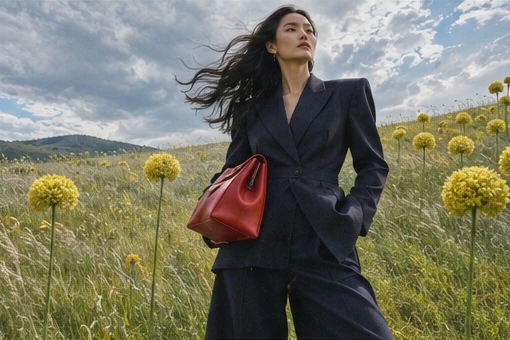
Choose a reference with a clear view of the model, suit, and red handbag. Define the layout before generating: the figure needs a readable silhouette and open space for a headline above the right shoulder.
Generate a Soul 2 version with that single reference and the prompt below. Review the pose, the wind through the fabric, the lighting, and the way the red bag separates from the dark jacket.
Run Nano Banana Pro with the same reference and prompt. Begin with a comparable delivery crop. For a product-specific follow-up, add close views of the bag that explain its clasp, strap attachments, and seams.
Place each result into the intended layout. Evaluate the fashion spread and the product placement separately, then record which version meets each brief and what retouching or regeneration it still needs.
Try the prompt
Place the model in a dark tailored suit in a windy meadow of yellow flowers. Keep the red handbag visible against the jacket. Leave clear sky above the right shoulder for a headline.
For the fashion spread, judge the silhouette, expression and movement in the cloth. For a product placement, compare the clasp, strap attachment and seam count with the reference. The same frame can clear one brief and fail the other.
Inspect the details that sell the frame
For editorial use, inspect the line of the shoulders, the relationship between the figure and the horizon, and the direction of the wind. The clothes should have enough shape to read at a glance, and the background should leave the headline area calm. A dramatic expression has value when it supports the campaign’s mood and the final crop.
For merchandising, use the reference as a checklist. Count the visible seams, inspect the closure, follow the strap into its attachment, and compare the red material under the scene’s light. Request a focused correction to a specific detail, then review the entire bag again. Save the approved product frame alongside the reference set used to create it.
Separate editorial approval from product approval
A fashion photograph and a product listing can share the same handbag while serving different decisions. The fashion frame needs an expressive pose, a strong silhouette, and a coherent atmosphere. The product frame needs the specific clasp, strap, seams, and material to remain recognizable. Write both briefs before comparing the outputs so the strongest mood does not hide a product mismatch.
For the editorial brief, decide where the viewer should look first. The red bag can be the main color accent while the coat and coastline establish the setting. Leave the intended headline area calm. A photograph that communicates the campaign immediately may be useful even when the final design team plans a separate product detail insert.
For the merchandising brief, create an explicit product checklist from approved photographs. Count the visible seams, note the handle shape, and identify the clasp design. Compare those details at the delivery size. If a customer expects the image to explain the exact product, attractive styling alone does not complete the assignment.
Build a fair reference comparison
Soul 2 accepts one optional reference in the Sequencer catalog. Nano Banana Pro accepts up to fourteen images. Begin the shared comparison with the same single reference so both models receive comparable evidence. Keep the prompt and intended composition consistent. Record the selected output settings, since Soul 2 offers 720p and 1080p while Nano Banana Pro offers 1K, 2K, and 4K.
Then run a separate task that uses Nano Banana Pro’s additional reference capacity. Include a front view of the bag, a close view of the clasp, and a side view of the strap attachment when those details matter. Identify each reference’s role. This second task answers whether the richer input set helps the product brief; it should have its own acceptance note.
Keep the main campaign image in the set when requesting a focused change. A product close-up can explain the hardware without defining the person’s pose or the coastline. Tell the model which details come from the product views and which come from the approved campaign. Review the whole subject after the edit so an improved clasp does not arrive with a changed face.
Three briefs with different approval criteria
•
Editorial cover: A person in a sculptural charcoal coat stands above a pale sea. A red handbag hangs from the left hand. Wind lifts the coat hem once in the implied moment. Leave calm sky above the right shoulder for a headline. Judge the pose, silhouette, palette, and room for type in the finished cover layout.
•
Product detail: Photograph the referenced red handbag on a neutral stone surface with its front facing the camera. Preserve the clasp, seam pattern, handle width, and strap attachments. Use soft side light to show the grain of the leather. Judge the physical construction against the approved product photographs.
•
Campaign revision: Keep the approved coastal portrait, person, coat, camera, and light. Replace the bag with the blue version shown in the supporting product reference. Preserve the blue bag’s own hardware and proportions. Compare the pose and face with the source, then inspect the product separately at full delivery size.
Read the tradeoffs in the output
A cinematic image can conceal practical weaknesses. Strong backlight may make the bag difficult to inspect. A dramatic crop may remove a strap attachment that the product team needs to see. Decide whether those choices support the current deliverable. You can keep a strong editorial image and still request a separate, clearer product shot for the same campaign.
A detailed product image can also miss the editorial brief. Perfectly visible hardware may come with a rigid pose or a busy background that leaves no headline space. Revise the composition without losing the approved object evidence. Compare images inside the actual publication or product grid, where the hierarchy and crop are part of the result.
For a recurring person, carry the same approved appearance reference and wardrobe notes across the set. Inspect facial structure, hair, and proportions in every image. The reference count and model name describe available inputs; the generated series still needs an image-by-image consistency review.
Price the comparison and finish the campaign
The November 17 catalog lists Soul 2 base image rates of $0.00368 at 720p and $0.006555 at 1080p. Nano Banana Pro lists $0.1725 at 1K or 2K and $0.322 at 4K. These describe different output configurations. Use the current studio quote with the actual input set, and compare the total attempts needed to meet the chosen brief.
For planning, ten base Soul 2 generations at 1080p work out to about $0.066, while ten base Nano Banana Pro generations at 2K work out to $1.725. The lower charge is useful only when the result satisfies the assignment. Include any additional editing and finishing in the campaign budget. Save the accepted editorial frame, product frame, references, and layout together so later variations begin from approved decisions.
Common questions
Which model should I choose for this campaign?
Define the deliverable first. Try Soul 2 for the fashion image’s pose, atmosphere, and photographic styling. Try Nano Banana Pro when the task depends on a specific product detail, multiple reference views, or a targeted edit. Judge each output in the actual layout.
How do I keep a person recognizable across a series?
Carry the same approved reference, crop strategy, lighting notes, and wardrobe description across the set. Review the face in every image. If you use a separate identity workflow, verify its own supported controls before planning the series around it.
Does 4K guarantee better product accuracy?
A larger output gives you more detail to inspect. Product accuracy still comes from the references, the instructions, and the result itself. Confirm the construction of the bag at a working size, then inspect the final-resolution output before delivery.