Generation, precise revisions, and campaign consistency
SEQUENCER
8 min read
Based on the Sequencer model catalog checked November 17, 2026. Covers are editorial illustrations.
Contents
The creative brief
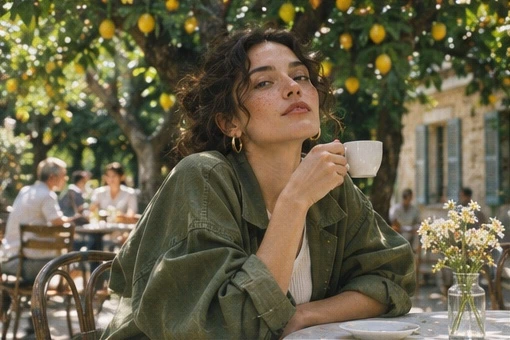
A café campaign often needs one small change after the art direction is approved. Sequencer lists two GPT Image 2.5 variants. Flare suits the search for a setting and composition. Sunburst is the candidate for a tightly specified revision once the team chooses a frame.
A fast setup and a precise revision
GPT Image 2.5 has two variants in Sequencer. Flare suits the search for a useful scene, composition, and visual direction. Sunburst is a candidate for a more exact edit after the campaign frame is approved. Both accept up to sixteen references and provide quality choices from Low through Max.
For the café photograph, the requested material change has consequences beyond the color of the cup. Translucent glass should show a different highlight, transmit some of the surrounding light, and affect what can be seen through its walls. Naming those consequences gives the model a physical task while the handle, hand, and table establish continuity.
Sequencer settings
GPT Image 2.5 settings in Sequencer
Setting
Available options
Variants
GPT Image 2.5 Flare and Sunburst
Mode
Image generation or editing
Reference images
Up to 16
Take the café frame through a revision
Use Flare to explore the café composition if you still need an opening image. Choose the delivery crop, then approve a frame with a clear view of the cup and the fingers holding it.
Attach the approved image as the main reference. Select the desired GPT Image 2.5 variant and keep the output dimensions consistent with that photograph. Add a material reference only if it clarifies the amber glass.
Send the edit prompt below. Name the material change first, then identify the surrounding details that should remain recognizable: the handle position, fingers, light on the table, and distant trees.
Compare the revision with the source at the same size. If you compare Flare and Sunburst, keep the quality setting, source image, and prompt the same. Save the successful version before asking for another change.
Try the prompt
In the supplied orchard café photograph, change the espresso cup from ivory ceramic to translucent amber glass. Preserve the handle position, fingers and hard patch of sunlight on the table.
Compare the edit with the source at the same size. The new material should alter the cup’s highlight and the light immediately beneath it. A change to the sitter’s face or the line of trees introduces extra retouching work.
Keep the whole photograph consistent
Start the review at the contact points. The cup handle should still fit the fingers, the rim should hold its shape, and the glass should meet the table or hand in the same place. Then look outward to the face, the line of trees, and the hard sunlight. These features help you judge whether the edit belongs to the original campaign frame.
Once the material works, revise one attribute per attempt. You might ask for lighter amber, a thinner glass wall, or a less prominent highlight. A narrow instruction makes it easier to identify what changed and preserve the approved parts of the scene. Check the final layout with its real headline and crop before approving a larger output.
Choose a variant with a production test
Begin with the task the image must complete. During concept development, compare whether the output gives the campaign a useful setting, subject, and composition. During revision, compare whether the requested change appears while the approved scene remains recognizable. Those are different tests, even when they use the same model family.
For a Flare and Sunburst comparison, hold the source image, prompt, dimensions, and selected quality consistent. Save both outputs before making another edit. Compare the cup, fingers, face, and background at the same scale. A variant that produces a more attractive new image may still create more work if the assignment was to preserve the approved photograph.
Record the current quote for each configuration. The choice should account for accepted results, revision effort, and the remaining production work. A naming convention based on variant and change, such as Flare amber cup or Sunburst thinner glass, makes review easier than a folder of numbered images with no explanation of the decisions.
Describe a material through visible consequences
Material words become more useful when they explain what the camera should see. Translucent amber glass can reveal the coffee through the wall, create a colored rim highlight, and cast a different patch of light below the cup. State which of those effects matters in the current photograph. The handle still needs to connect to the same fingers and carry the same apparent weight.
Prepare a material reference with similar lighting if possible. A glass sample photographed against black may explain its color but provide little evidence for how it looks in hard daylight. Tell the model which quality to borrow from the sample. Keep the approved café image as the source of framing, pose, and environmental light.
Review the edit from the contact region outward. Follow the rim, handle, fingers, and lower edge first, then inspect the light passing through the object. Finally compare the background and face. This order helps distinguish a material problem from an unintended scene revision, so the next instruction can address one specific issue.
Three prompts for a campaign series
•
Menu image: Create a close café scene with the referenced amber cup on a pale stone table. Keep the handle on the right, with one hard diagonal patch of sunlight behind the cup. Leave the upper left quiet for a menu heading. Review the drink surface, handle attachment, and available typography space.
•
Wardrobe revision: In the approved orchard photograph, change the sitter’s shirt from white cotton to pale blue linen. Keep the pose, face, cup, camera position, and sunlight consistent. Show a subtle linen weave with natural folds. Compare the face and fingers with the source before judging the new fabric.
•
Product range: Use the approved café composition and replace only the cup with the second referenced vessel. Keep the scene lighting and overall framing. Preserve the new vessel’s silhouette and handle proportions. Check the result alongside the first product image so the range feels photographed under the same campaign direction.
Adapt a campaign without losing its anchors
Define a small set of visual anchors before making the series: camera height, light direction, background distance, product scale, and color palette. Repeat these decisions in the brief for each placement. Let the composition change where the destination requires it, while keeping the product and campaign atmosphere consistent.
Treat a portrait adaptation as a composition task. Give the face, cup, and headline their own regions within the new canvas. Ask for a believable continuation of the orchard around them. Inspect the actual crop with its real typography, because a successful landscape frame may place the subject too close to a portrait edge.
When a campaign includes several product colors, approve the object shape before cycling through the palette. Save each approved version and compare the full range together. A small drift in handle size may be difficult to notice on one image and obvious when six images appear in the same product grid.
Use quality and size at the right stage
Choose a working size that lets the team judge the composition, then select the final dimensions and quality for delivery. Recheck the complete output after changing either setting. A larger generation gives you more detail to inspect, and it also creates another image that must meet the preservation requirements.
Budget the approved result rather than a single attempt. Include exploration, focused revisions, and any final generation. Save the source, prompt, references, output settings, and accepted file together. For the café edit, the final checklist includes the glass material, exact hand contact, unchanged subject identity, useful headline space, and consistent sunlight across the finished layout.
Common questions
Can I switch variants halfway through the edit?
Yes. Use the approved image as a reference in the other variant and carry over the same prompt and output dimensions. Keep the earlier version so you can compare the edit rather than relying on memory.
Do I need all sixteen reference slots?
Choose references by purpose. The approved café image may already define the entire shot. A second image can clarify the desired glass material. Add further references when they resolve a specific ambiguity in the brief.
When should I increase quality or output size?
First approve the composition and the requested change. Then choose the quality and dimensions needed for delivery, read the updated quote, and inspect the new result. Larger outputs are most useful once the team agrees on what the image should show.