Frame guidance, audio references, and believable physical action
SEQUENCER
8 min read
Based on the Sequencer model catalog checked November 17, 2026. Covers are editorial illustrations.
Contents
The creative brief
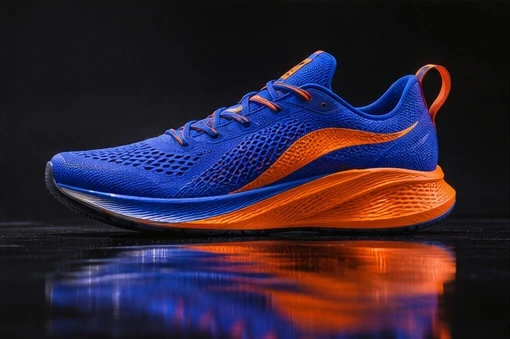
A glossy shoe on a reflective floor looks like a simple product shot until the sole makes contact. MiniMax H3 in Sequencer supports visual and audio references, synchronized sound and clips of 4–15 seconds at 768P or 2K. A short landing gives you a specific moment to evaluate.
Choose the right kind of guidance
MiniMax H3 can generate picture and sound within one shot. In Sequencer, the important setup choice is between frame guidance and reference guidance. Start and End Frames define the opening and closing compositions. The reference workflow can use images, video, and audio to explain the subject, movement, or sound.
Frame-guided and reference-guided inputs are separate modes. Reference guidance supports up to nine images, three videos, and three audio clips, subject to a twelve-reference total. An audio reference needs a visual reference as well. For the shoe landing, use frames to establish the contact composition, or a visual-and-audio reference set to explain a particular movement and sound.
Sequencer settings
MiniMax H3 settings in Sequencer
Setting
Available options
Resolution
768P or 2K
Duration
4–15 seconds
Inputs
Start/end frames or reference media, selected as separate modes
Direct a readable landing
Choose a side-on composition where the heel, forefoot, floor, and reflection can all be seen. Keep the camera still so the landing has a clear visual reference point.
Select MiniMax H3 in the video studio. Choose a five-second duration and a supported output, 768P or 2K. Decide whether the shot will use Start/End Frames or reference media before attaching inputs.
Use the prompt below to describe the sequence: heel contact, one compression through the sole, then a settle. Name the single rubber tap and the quiet background so the sound has a clear purpose.
Review the first touch at reduced speed, then play the complete take at normal speed with sound. Save the settings and the time of the contact frame. Revise the contact or the audio instruction individually when the two events disagree.
Try the prompt
Side view of one cobalt running shoe dropping onto a black lacquer floor. The heel touches first, the sole compresses once, and the shoe settles. A single rubber tap accompanies contact.
Scrub through the landing, then play it at normal speed with sound. Look for a reflection that meets the sole and a tap that lands on contact. A longer clip offers little value until those two events agree.
Check weight, contact, and sound together
The landing depends on several events agreeing. The falling shoe should slow as it meets the floor, the sole should compress once, and the reflection should meet the visible shoe at the contact point. A second bounce or a shifting reflection changes the perceived weight, even when the material detail is attractive.
For a rhythmic edit, place the generated contact against the actual music track and check the cut in context. A synchronized sound effect in one clip still needs to sit correctly on the editorial timeline. Preserve an approved visual take before requesting a different sound or duration, and review the whole replacement generation before using it in the sequence.
Choose the mode around the control you need
Start/End Frames are useful when the opening and closing compositions already exist. For the shoe, the first frame can establish the object above the floor and the ending can establish its settled position. Keep the camera and product consistent across the frames so the model is solving a movement between two compatible states.
Reference media is useful when the assignment depends on a particular motion, performance, or sound. MiniMax H3 supports up to nine reference images, three reference videos, and three audio references within a twelve-reference total. Those are shared planning limits, so nine images plus three videos already fill the total allowance. Choose the few references that explain the shot most clearly.
An audio reference requires visual guidance as well. Tell the model what the audio contributes and which visual input defines the subject. If a sound clip contains both an impact and background noise, explain which part matters. Keep the input set aligned with one performance rather than asking several unrelated references to define the same moment.
Plan the sound as part of the action
Describe a sound event with a visible cause. For the landing, the cause is the sole touching the floor. A short rubber impact and a quiet room give the reviewer a simple relationship to assess. For a spoken performance, the visible cause is the speaker’s delivery. The picture, timing, and sound should be judged together after the visual continuity check.
When using prerecorded audio, plan the shot around that exact recording. Identify the action or performance beat that should coincide with the important sound. Keep enough room in the framing to see the relevant mouth, hand, instrument, or contact point. A beautiful close-up that hides the cause of the sound makes synchronization harder to judge.
Generated audio can support a shot without defining the final soundtrack. Place the approved visual take on the production timeline and compare it with the actual music and effects. Check the attack, the length of the visible action, and the space after it. Save the accepted version before trying another sound treatment so a useful performance remains available.
Three prompts for physical action and sound
•
Basketball bounce: Locked low camera beside a gym floor. A hand releases one basketball, the ball strikes the floor once, rises, and is caught. Keep the floor markings fixed and the ball round. Include one clear impact and a quiet room tail. Review compression at contact, the bounce path, and the timing of the sound.
•
Spoken reaction: Medium close shot of the referenced character at a kitchen table. The character listens briefly, gives the supplied short line, then settles into a small smile. Keep the head movement restrained and the mouth clearly visible. Review the performance against the actual audio reference and inspect facial consistency throughout.
•
Product set-down: A hand lowers a metal water bottle onto a wooden counter, releases it, and moves away. Keep the bottle upright and the camera still. Include a soft contact sound followed by quiet room ambience. Check the bottom edge, the release of the fingers, and whether the bottle remains stable after contact.
Diagnose contact and timing problems
If the shoe floats above its reflection, make the floor contact more explicit and use a composition with a clear contact line. If the product changes shape, reduce its rotation and keep the silhouette visible. If the sole compresses repeatedly, describe one compression followed by a settle. A short sequence with one physical objective is easier to evaluate than a series of unrelated gestures.
Review once at normal speed before examining individual frames. The first pass tells you whether the action reads as a complete event. The slower pass helps locate a specific failure, such as an early impact sound or a heel that never reaches the floor. Use that diagnosis to change the instruction or reference strategy, then compare the next result against the same acceptance point.
Avoid adding a camera move simply to hide a weak interaction. First approve the product and contact with a stable camera. Then test a camera treatment that serves the finished edit. That separates the physical performance from the visual presentation and gives you a useful fallback if the more complex shot needs more attempts.
Choose duration and finish the shot
MiniMax H3 supports 4–15-second clips at 768P or 2K in the current catalog. Choose enough time for preparation, contact, and a hold without filling the take with extra actions. For this brief, five seconds is a useful starting test. A longer clip can provide editing room, but every additional moment needs the product, floor, and performance to remain consistent.
Read the live quote for the selected mode, duration, output, and references. Include rejected attempts and any separate finishing work in the shot budget. Before delivery, inspect the final-resolution clip with the actual soundtrack and neighboring shots. Check the product silhouette, contact, sound timing, beginning and ending handles, and the crop used by the final placement.
Common questions
Can I combine Start/End Frames with audio references?
Choose the reference-media mode when you need audio references. Start/End Frames belong to the separate frame-guided workflow in Sequencer. Plan the input set around the part of the shot you need to control most closely.
What can an audio reference contribute?
It can guide the sound in a reference-driven shot. Supply a visual reference alongside it and describe the role of each input. For this test, identify the impact sound clearly and keep the surrounding action simple enough to judge its timing.
How long should the first test be?
Five seconds gives this brief room for the drop, the contact, and a short settle. MiniMax H3 supports 4–15-second clips. Extend the duration when the performance needs another readable beat, then inspect whether the product shape and floor relationship remain stable.