WORLDSTREAMS

Tuning Into Reality

Connecting to the world

Model Reviews
November 17, 2026

Kling 3.0 vs Kling 4.0

A practical comparison with ten prompts to test
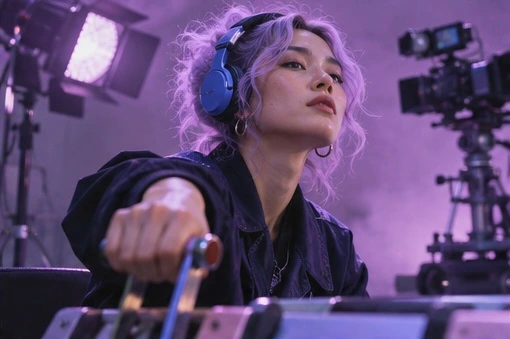
A sound engineer wearing headphones reaches toward a mixing console.
Based on the Sequencer model catalog checked November 17, 2026. Covers are editorial illustrations.
Contents

The creative brief

For a shot with one action, Kling 3.0 Standard already offers a useful test window of 3–15 seconds. Kling 4.0 extends to 30 seconds and accepts video edits. That difference matters most when a director needs to revise an existing performance or let two actions play out without a cut.

Compare the controls before the image

The practical difference begins with the kind of control the shot needs. Kling 3.0 Standard supports a beginning frame and an ending frame within a 3–15-second clip. Kling 4.0 adds intermediate frames, reference images, reference videos, and an existing-video edit workflow, with generation lengths up to 30 seconds.
For the engineer lowering a fader, both models can be judged on a five-second performance from the same starting image. A longer duration becomes useful when you need to see the decision, the reach, and the reaction as separate beats. Choose a model for those requirements before adding complexity to the prompt.
Kling 3.0 Standard and Kling 4.0 controls in Sequencer
ControlKling 3.0 StandardKling 4.0
Clip length3–15 seconds3–30 seconds
Frame guidanceStart and endStart, middle, and end
Existing-video editsUse a separate editing modelVideo to Edit input
Reference workflowCheck the selected model inputsImage and video references

Sequencer settings

Kling 3.0 vs Kling 4.0 settings in Sequencer
SettingAvailable options
ComparisonKling 3.0 Standard and Kling 4.0
Test duration5 seconds from the same starting image
Kling 3.0 Standard duration3–15 seconds
Kling 4.0 duration3–30 seconds

Run a fair five-second comparison

  1. Prepare one starting image with the hand, fader, and face visible. Give the hand enough space to reach its target without leaving the frame. Use that exact image in both models.
  2. Select Kling 3.0 Standard, set five seconds, and use the prompt below. Keep the camera locked so movement in the result comes from the performance and the interaction.
  3. Repeat with Kling 4.0 using the same starting image, prompt, duration, and aspect ratio. Save the settings and quote for each attempt. Where a control differs, record that difference alongside the result.
  4. Compare the first contact, the fader movement, and the final facial reaction at normal speed and frame by frame. Keep a short note on why each take is accepted or rejected, then revise the failing instruction in one model at a time.

Try the prompt

Locked medium shot. The sound engineer listens, reaches forward and lowers one fader. Hold on her face as the room goes quiet.
Open video studio

What to look for

Run the five-second version from the same starting image in each model. Watch the wrist and fader at contact, then the beat after the gesture. Choose the take that communicates the decision. Extra duration earns its cost only if the scene needs it.

Decide when the longer take earns its place

Extend the shot only after the physical action is readable. In a longer version, use the extra time to establish listening before the reach and to hold the reaction afterward. Keeping those beats separate gives you more useful editing choices than asking for additional gestures, a camera move, and a location change in the same take.
For Kling 4.0, add an intermediate frame when a particular pose or moment matters. If the task is a change to an existing performance, use Video to Edit and describe the change alongside the features to preserve. A generation comparison and an editing comparison answer different questions, so keep the source inputs and acceptance notes with each test.

Write the action as a sequence

A useful video prompt tells the model what changes during the shot. Establish the subject and framing, name the action, then describe the ending state. For the engineer, listening, reaching, and holding the reaction are three connected beats. Writing them in that order gives the performance a readable shape. Start with a locked camera so you can judge the action before adding another moving element.
Choose a duration that gives those beats room. A five-second insert can contain one clear gesture and a reaction. A longer take can establish a situation, play the gesture, and hold its consequence. If the brief introduces another location, a new character, and a new camera setup, consider separate clips so each part has a clear editing purpose.
References should explain something the prompt cannot specify reliably. A starting frame defines the opening composition. An ending frame defines where the performance must arrive. Kling 4.0 middle frames can clarify an intermediate state, while reference media can describe appearance or motion. Keep a note of those input differences when comparing the models, since they change what the test is asking.

Ten original prompts for a useful comparison

These are test briefs, rather than measured results. Try the first eight with comparable starting images and a five-second duration in both models. The final two exercise Kling 4.0 controls that change the task. Review each result against the stated acceptance point before deciding which model fits your production.
•
1. Product touch: Locked close shot of a hand beside a ceramic cup. The hand reaches for the handle, closes around it, and lifts the cup a few centimeters. Keep the tabletop and window light consistent. Judge finger contact, handle shape, and whether the cup has believable weight during the lift.
•
2. Quiet reaction: Medium portrait of a chef looking toward an oven outside the frame. She notices something, pauses, then gives a small relieved smile. Keep the camera fixed and let the expression develop gradually. Judge whether the eyes, mouth, and timing communicate one thought without an extra gesture.
•
3. Fabric movement: A person in a long navy coat stands on a station platform. A passing breeze lifts the hem once, then the fabric settles. The person stays in place. Judge the coat silhouette, the connection between fabric and body, and the direction of the breeze across the whole shot.
•
4. Camera approach: A red bicycle stands against a pale wall. The camera moves slowly closer while keeping the bicycle centered. Afternoon shadows remain fixed on the wall. Judge the consistency of wheels, handlebars, and frame geometry, and whether the move feels continuous from beginning to end.
•
5. Object reveal: Locked table-level shot of a small gift box. Two hands lift the lid and set it beside the box, revealing a silver ring inside. Keep the ring visible at the end. Judge the lid separation, hand contact, and the relationship between the box interior and the revealed object.
•
6. Walking entrance: Wide shot of a quiet library aisle. A reader enters from the left, stops at a shelf, and looks at one book spine. The camera stays still. Judge foot contact, the stop, and whether the shelf remains stable while the subject crosses in front of it.
•
7. Pouring detail: Close shot of a glass on a dark counter. A hand tilts a small pitcher and pours one steady stream of water, then returns the pitcher upright. Judge the connection between pitcher and stream, the rising water level, and the final separation of the stream.
•
8. Two-person attention: Medium two-shot of two musicians waiting backstage. One looks toward a doorway; the other follows that eyeline after a brief pause. Keep both people seated. Judge the order of their reactions, the consistency of their faces, and the sense that they are looking at the same event.
•
9. Guided intermediate pose: In Kling 4.0, use opening, middle, and ending images of the same dancer. Move from a standing preparation through the middle turn to the final held pose. Keep wardrobe and camera position consistent. Judge how the movement connects the supplied poses and whether the intermediate image clarifies the turn.
•
10. Existing-video revision: In Kling 4.0, supply an approved clip through Video to Edit. Change the actor’s jacket from tan to dark blue while preserving the action, camera movement, and scene lighting. Judge the clothing boundary through the entire clip and compare the performance with the source.


Compare costs at the settings you will use

The November 17 Sequencer catalog lists Kling 3.0 Standard at $0.2576 per second. Kling 4.0 lists $0.18055 per second at 720p and $0.27025 at 1080p. A five-second base generation therefore works out to $1.288 for Kling 3.0 Standard, about $0.903 for Kling 4.0 at 720p, and about $1.351 at 1080p. Check the studio quote for the actual task and inputs.
Those rates do not establish a quality ranking. Resolution, input controls, and the number of usable takes all affect the production decision. Ten attempts at a cheaper setting can cost more than a small number of successful attempts at another setting. Record the amount spent on the comparison and the number of shots you would actually use.
Keep duration constant for the first comparison. A five-second clip and a fifteen-second clip answer different creative questions even when they show the same subject. Once one short version works, test the longer duration for its specific editorial benefit, such as a longer listening beat or room for an entrance before the action.

Diagnose failures before changing models

If hands pass through an object, simplify the action and show the contact region clearly in the starting image. If the subject changes identity during a move, reduce the amount of occlusion and compare a shorter take. If the camera ignores the intended direction, use a single movement instruction and a scene with clear foreground and background landmarks.
Use a small review sheet for framing, physical contact, subject consistency, action timing, and editing usefulness. A clip can pass four categories and still fail the one that matters to the brief. Write a short acceptance note for each take so the next prompt changes the actual problem. That record gives the comparison practical value beyond choosing a favorite thumbnail.

Common questions

Is Kling 4.0 automatically the better choice?
Use the controls and accepted result to decide. A short shot may already work with Kling 3.0 Standard. Kling 4.0 becomes useful when the brief needs a longer take, intermediate frames, video references, or changes to existing footage.
Should I give both models an ending frame?
Use the same ending frame in both if reaching that composition is part of the test. For an open-ended performance test, start with the same opening image alone. Compare one input strategy at a time so you can explain what improved the result.
What is the most useful cost comparison?
Compare the total cost of attempts that produce an accepted shot. Record the duration, selected settings, and any cleanup needed. A cheaper individual generation can require more retries, while a more expensive attempt may give you a usable performance sooner.
Pricing