Storyboard guidance, synchronized audio, and video continuation
SEQUENCER
8 min read
Based on the Sequencer model catalog checked November 17, 2026. Covers are editorial illustrations.
Contents
The creative brief
For a music insert, a convincing room is only half the assignment. The audience watches the bow while hearing the attack of the note. Sequencer’s FLUX.3 video model supports synchronized audio, keyframes and 5–20-second clips at 720p or 1080p. Give it one musical gesture with a visible beginning and end.
Direct the image sequence and its sound
FLUX.3 is a video choice in Sequencer with optional synchronized audio. It accepts a written scene or an ordered set of up to ten storyboard images. That makes it useful for planning a musical gesture as a visible progression: preparation, bow contact, sustained movement, and release.
The order of the attached images matters. One image establishes the opening, two can define the beginning and ending, and a longer set provides storyboard guidance across the clip. Describe the camera, light, musical action, and sound in the prompt so the visual direction and the listening task are part of the same brief.
Sequencer settings
FLUX.3 settings in Sequencer
Setting
Available options
Resolution
720p or 1080p
Duration
5–20 seconds
Audio
Synchronized audio enabled
Stage one complete musical gesture
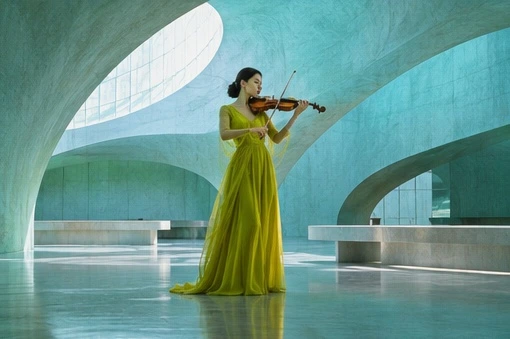
Frame the violinist so the bow, bridge, right hand, and upper body remain visible. A locked wide shot makes contact and movement easier to judge than a camera move that hides the instrument.
Select FLUX.3 in the video studio. Begin with a five-second clip at 720p and choose the aspect ratio for the final edit. Turn Audio on when you want the generated attack, sustained tone, and room decay.
Attach a starting image or an ordered storyboard if you need visual guidance. Keep the sequence consistent in wardrobe, instrument, light, and camera position. Set the duration explicitly for a storyboard with several images.
Use the prompt below. Review the clip muted for physical continuity, then listen and watch together for the note onset and release. Once the gesture reads clearly, choose the final duration and resolution and inspect that output again.
Try the prompt
Wide shot in a curved turquoise recital hall. A solo violinist lifts the bow, plays one sustained note on a down-bow, then lifts it clear. The camera stays still. Let the note decay into the room.
Watch once muted for bow contact and a continuous stroke. Then listen for the attack and decay. For a cut to a prerecorded performance, judge sync against that recording before committing to a sequence of shots.
Match the bow to the note
The first audible attack should agree with the beginning of the bow stroke. Follow the bow through the sustained note and check that it remains in contact with the strings at a believable angle. At the end, the bow lift and the decay should feel like the conclusion of the same action.
If the final film uses a prerecorded performance, test the shot against that exact recording on the timeline. Compare the attack, the length of the stroke, and the visible release. You may need a different gesture length or a different cut point. FLUX.3 Draft and Continuation are separate catalog choices for exploration and extension, so check their own inputs and quotes when the workflow changes.
Plan a storyboard the shot can connect
A storyboard gives FLUX.3 an ordered visual progression. Start by deciding which moments need to be shown: the violinist preparing, the bow touching the strings, the sustained stroke, and the release. Use a consistent camera position, instrument, wardrobe, and light across those images. The progression should describe one performance within the selected duration.
Use as many images as the action needs to become clear, up to the supported ten-image limit. A second frame can establish a useful ending. Additional frames should resolve an actual staging question, such as the bow position during the note. Too many nearly identical frames can add preparation work without explaining any new part of the action.
Check the time available between moments. A short clip cannot comfortably contain a long preparation, several musical phrases, and a full room decay. Simplify the performance or choose a longer duration. Set the intended duration explicitly when the storyboard covers multiple beats, then review how the generated movement connects the supplied moments.
Give optional audio a clear purpose
Enable Audio when the shot needs generated synchronized sound. For the violin insert, describe one note, its attack, and its decay into the room. Name the visible action that creates the sound. The same method applies to a door closing, a spoken line, or a small product interaction: the sound event should have a clear place within the action.
A silent version can be useful while judging motion, but approval of a silent take does not verify the sound of a new generation. Review the final picture and audio together. Listen for unwanted speech or music, sudden changes in ambience, and the relationship between the visible release and the audible ending.
For a prerecorded musical performance, judge the clip against the actual recording on the editing timeline. A convincing generated violin sound does not establish synchronization with another track. Match the bow contact, stroke length, and release to that recording. Choose a cut point that supports the performance when exact long-duration synchronization is difficult.
Three prompts beyond the music insert
•
Workshop action: Wide fixed shot of a craftsperson at a wooden bench. The craftsperson draws one plane stroke along a board, lifts the tool, and examines the surface. Include a brief scraping sound and quiet workshop ambience. Review tool contact, hand position, and whether the sound begins with the stroke.
•
Architectural atmosphere: Slow forward move through a pale stone hallway toward an open courtyard. A light breeze moves one curtain near the doorway. Include soft footsteps and distant outdoor ambience. Keep the walls straight and the doorway stable. Review the movement, spatial continuity, and consistency of the room tone.
•
Product interaction: Locked close shot of a hand turning the dial on a small radio. The hand stops at one position, then releases the dial. A brief burst of static resolves into quiet room sound. Keep the radio body and printed markings consistent. Check the dial contact and the order of the visible and audible events.
Use the continuation workflow for an existing clip
Sequencer lists FLUX.3 Continuation and its Draft variant separately from the base generation model. Choose the continuation entry when the task begins with existing footage, then check that entry’s source-video requirements and current quote. Keep the source clip available so you can compare the new beginning with the end of the approved performance.
Describe what happens next rather than restating a complete new scene. After the violinist lifts the bow, the next beat might be a breath and a quiet hold. Keep the same camera, room, instrument, and light. If the next part requires a new camera setup, a separate shot may give the editor a clearer transition than asking a continuation to invent a cut.
Inspect the seam in both picture and sound. Watch the final movement of the source and the first movement of the continuation, then listen for a change in ambience or tone. Put the combined clip on the timeline and view it without pausing at the join. The extension is useful when it plays as one continuous editorial moment.
Budget resolution, duration, and accepted output
The November 17 Sequencer catalog lists FLUX.3 base rates of $0.1955 per second at 720p and $0.3335 at 1080p. A five-second base generation works out to about $0.98 and $1.67 respectively. Read the current studio quote for the configured request and check the separate rates when switching to Draft or Continuation.
Begin with a duration that demonstrates the critical gesture, then choose the final output for the destination. Include rejected attempts and any extension work when estimating cost per accepted shot. For the violinist, delivery requires a believable instrument, continuous bow movement, a useful note attack and release, stable room geometry, and enough space at the cut to fit the actual sequence.
Common questions
Can I make a silent version?
Yes. Audio is optional in the FLUX.3 generation controls. A silent test can help you concentrate on the bow and body movement. For a finished clip with generated sound, enable Audio and review the resulting picture and sound together.
How should I order storyboard images?
Arrange them in playback order and show a progression that can happen within the selected duration. Keep the same instrument, clothing, light, and camera geography. Each image should clarify a meaningful moment in the action.
Can I extend an existing performance?
Sequencer lists FLUX.3 Continuation and FLUX.3 Continuation Draft separately from the base model. Select the appropriate continuation entry, check its source-video requirements, and describe what happens after the existing clip. Review the transition in both picture and sound.