
Sand AI’s MAGI‑2 animates a still, generates a video from text, or builds a shot around image, video and audio references. Its strongest launch result was image-to-video. In Sequencer, a five-second clip costs $0.46 at the listed rate. Start with an approved frame when the subject or composition has to carry through the shot. Open MAGI‑2 in Sequencer
Specs and input modes
Sand AI reports 480 billion total parameters and about 28 billion active in its mixture-of-experts backbone. MAGI‑2 generates the picture and its sound together, so a prompt can describe both an action and the sound it makes. Sand AI’s technical launch
| Setting | MAGI‑2 in Sequencer through Higgsfield |
|---|---|
| Output | 1080p at 25 fps |
| Duration | 4–30 seconds in whole seconds |
| Aspect ratios | 16:9, 9:16, 1:1, 4:3, 3:4, 21:9 |
| Sound | Synchronized audio on by default, with a toggle |
| Frames | Start frame with an optional end frame |
| References | Up to 10 images, 5 videos and 5 audio clips, 20 combined |
Choose Frames to specify the start and finish of a shot. Choose References to guide appearance, motion or sound across the shot. Start with one reference for each detail that matters, such as a product still for shape and a short clip for camera movement. Keep each video or audio reference between 2 and 30 seconds. Higgsfield also limits combined video-reference duration and combined audio-reference duration to 30 seconds each. Higgsfield model guide · Higgsfield API limits
Artificial Analysis Elo benchmark
Artificial Analysis Video Arena v2.1 uses blind human preference votes. Its boards judge different tasks, and each rank below is a snapshot checked November 26, 2026. Benchmark methodology
| Artificial Analysis task | MAGI‑2 Elo | Place |
|---|---|---|
| Image-to-video with audio | 1,163 ± 14 | 1st |
| Image-to-video without audio | 1,153 | 1st |
| Text-to-video without audio | 1,144 | 2nd |
| Text-to-video with audio | 1,150 ± 13 | 7th |
Image-to-video with audio is the standout result. MAGI‑2 led Dreamina Seedance 2.5 by five Elo points on that board, with overlapping 95% intervals and a published rank range of 1–3 for both. Sand AI also reports a four-task average of 1,150.3, up from 998.5 for MAGI‑2 Preview. Image-to-video leaderboard · Text-to-video leaderboard · Sand AI’s launch comparison
Higgsfield Video Arena
In Higgsfield’s own six-model Arena snapshot on November 24, MAGI‑2 ranked second with a score of 1,146 and a 60.5% overall win rate. It won 71% of its matchups against Seedance 2.0 and 39% against Seedance 2.5. Use those results to compare models within Higgsfield’s test and the Artificial Analysis results to compare performance by input mode. Higgsfield Arena snapshot
Generate in Sequencer
- Open Videos, then select MAGI‑2 from Featured Models. The direct link selects it for you.
- Add a prompt. For an image-led shot, add a start frame. Add an end frame if the final composition matters, or use reference media to guide the look, movement or sound.
- Pick an aspect ratio and duration, choose whether to generate audio, and check the quote before generating. Open the result in your video library to review the motion and listen for cues. Open MAGI‑2
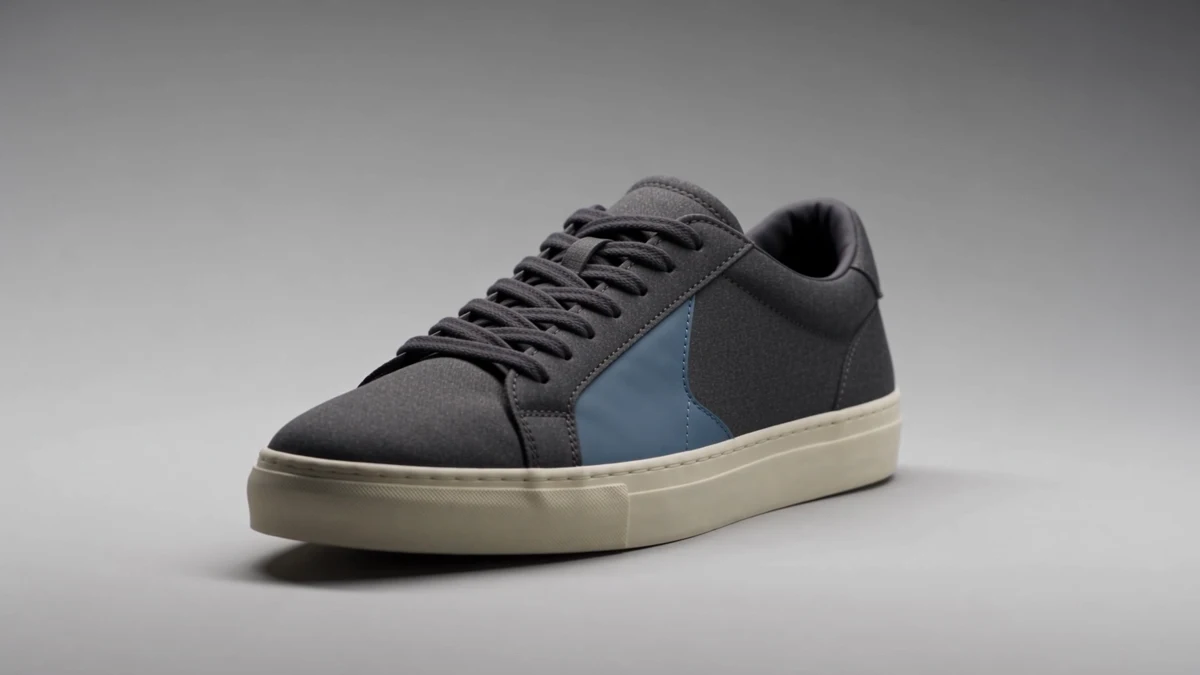
For a first test, use a product still and try this prompt: “Slowly push in on the charcoal sneaker. Keep the blue side panel and cream sole consistent. Let a soft highlight move across the upper. Add quiet room tone.” Check the stitching, sole shape and audio timing across the shot. The cover is a frame from a four-second MAGI‑2 reference generation verified in Sequencer.
Generate with Sequencer MCP
Connect a client to the full Sequencer MCP server at https://mcp.sequencer.media/ and sign in to your Sequencer account. For Codex, use the following commands. Sequencer MCP setup
codex mcp add sequencer \
  --url https://mcp.sequencer.media/
codex mcp login sequencer
Use get_model_catalog to check the current model settings, then call generate_video with model set to higgsfield-magi-2. This example uses the default workspace. For an existing still in Sequencer, add its sourceImageMediaId. Call get_media with the returned media ID and its workspace to check the queued job and get the video once ready.
{
  "model": "higgsfield-magi-2",
  "prompt": "Slow push in on a charcoal sneaker.",
  "duration": 5,
  "resolution": "1080p",
  "aspectRatio": "16:9",
  "generateAudio": true
}
Generate with the Sequencer REST API
Set SEQUENCER_API_KEY on your server and use a workspace ID from GET /v1/workspaces. Replace YOUR_WORKSPACE_ID in the example. The generation call returns HTTP 202 and a task ID. Poll the returned pollUrl, or GET /v1/tasks/{taskId}, until the task completes or fails. Sequencer API documentation
curl -sS https://api.sequencer.media/v1/generate \
  -H "x-api-key: $SEQUENCER_API_KEY" \
  -H 'Content-Type: application/json' \
  -d '{
    "type": "video",
    "model": "higgsfield-magi-2",
    "workspaceId": "YOUR_WORKSPACE_ID",
    "prompt": "Slow push in on a charcoal sneaker.",
    "duration": 5,
    "resolution": "1080p",
    "aspectRatio": "16:9",
    "generateAudio": true
  }'
Direct Higgsfield API and price
For direct access, create a Higgsfield API key and submit to https://api.higgsfield.ai/sand/magi-2/text-to-video with Authorization: Key KEY_ID:KEY_SECRET. Send a prompt, duration, resolution, aspect_ratio and generate_audio. Higgsfield’s SDK can wait for the queued result. Use image-to-video for first and last frames or reference-to-video for mixed media. The standard API account runs one MAGI‑2 job at a time across the three modes. Higgsfield API example and queue limits · Image-to-video request fields
| Output length | Sequencer app, MCP or REST | Direct Higgsfield API |
|---|---|---|
| Per second | $0.092 | $0.08 |
| 5 seconds | $0.46 | $0.40 |
| 10 seconds | $0.92 | $0.80 |
| 30 seconds | $2.76 | $2.40 |
These are listed USD rates for 1080p output, with generated audio included. Sand AI also lists $0.08/s for 1080p through its own API, which requires an enabled organization. Its API schema shows a 540p setting subject to model and input compatibility. Sequencer’s Higgsfield integration offers 1080p across all three modes. Sequencer pricing · Sand AI pricing · Sand AI request schema